Sony XDR-P1DBP - Instrukcja obsługi
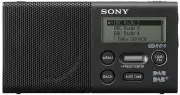
Instrukcja obsługi urządzenia Sony Digital Radio DAB/FM opisuje podstawowe procedury konfiguracji i obsługi, w tym wstępną konfigurację, strojenie stacji i zarządzanie presetami. Przewodnik obejmuje podstawowe funkcje, takie jak regulacja głośności, zarządzanie trybami uśpienia i obsługa połączeń słuchawkowych, jednocześnie podkreślając środki ostrożności. Zawiera również rozwiązywanie typowych problemów oraz podaje dane techniczne, takie jak zakres częstotliwości i wymagania dotyczące baterii.

XDR-P1DBP [GB]
4-563-193-
12
(1)
Setup Menu Options
Press MENU to enter the setup menu.
Slide the jog lever up or down to select the
desired menu item or setting.
Press the lever to confirm the selection.
Example: When the DAB band is selected
BACK
To go back to the upper menu level
Press BACK.
To exit the setup menu
Press MENU again.
Sleep
The radio automatically turns off after a set
time has elapsed.
Select the desired timer setting (minutes)
from the following:
Off
(deactivated)/
15 min.
/
30 min.
/
45 min.
/
60 min.
When the sleep timer is set, “SLEEP” lights up
on the display.
Save Preset
You can preset stations to the preset list.
DAB Manual Tune
If DAB reception by DAB auto tune is poor, try
manual tuning.
Slide the jog lever up or down to select
the desired DAB channel, then press the
lever.
The radio starts scanning for receivable
stations in the selected channel.
Tip
The new station received by manual tuning is
stored in the DAB station list.
Information
Displays information for the station you are
listening to. Slide the jog lever up or down to
scroll through the following information:
Channel:
Channel and frequency (See the
DAB frequency table in “Specifications.”)
Multiplex Name:
Ensemble label (up to
16 characters long)
Service Name:
Station name
PTY:
PTY label (See “PTY (programme type)”
Bit Rate:
Bit rate
Signal Level :
Displays the signal level of the
DAB station you are listening to, ranging from
0 (no signal) to 100 (maximum signal).
Displays PTY label (see “PTY (programme
type)” in “Specifications”) for the station you
are listening to.
Note
If there is no ensemble label or no station name,
the space for label or name will be blank.
Time
Set Time:
“Auto (DAB)” is set by default. This
enables the clock to synchronize with the DAB
data being received. Select “Manual” to set
the clock manually using the jog lever.
12H/24H:
Select the clock display mode,
12-hour clock or 24-hour clock.
Beep
Select “On” to activate the beep sound when
you operate the radio.
Initialize
Select “OK” to initialize the radio to the factory
default settings. All settings, DAB and FM
station lists and presets will be deleted.
Specifications
Precautions
•
Operate the unit only on the power sources
specified in “Specifications.”
•
Use the unit within a temperature range of 0°C
to 40°C. If it is used in temperatures higher
than this range, the display may gradually turn
black. If it is used in temperatures lower than
this range, the display may change very slowly.
(These irregularities will disappear and there
will be no damage to the unit when the unit is
used in the recommended temperature range
again.)
•
Avoid exposure to temperature extremes,
direct sunlight, moisture, sand, dust or
mechanical shock. Never leave in a car parked
in the sun.
•
Should any solid object or liquid fall into the
unit, disconnect the micro USB cable, and have
the unit checked by a qualified personnel
before operating it any further.
•
Since a strong magnet is used for the speakers,
keep personal credit cards using magnetic
coding or spring-wound watches away from
the unit to prevent possible damage from the
magnetism.
•
To clean the casing, use a soft dry cloth. Do not
use any type of solvent, such as alcohol or
benzine, which may damage the finish.
•
Do not operate the unit with wet hands since it
may cause a short circuit.
•
When you do not use the unit for a long time,
charge the battery every 6 months.
•
Make sure not to splash water on the unit. This
unit is not waterproof.
•
Under certain circumstances, especially when
the air is very dry, it is not uncommon to
experience a discharge of static electricity, or
shock, when your body comes in contact with
another object, in this case the ear buds
touching your ear(s). The energy from this
natural discharge is extremely small and is not
emitted by your product but rather a natural
environmental occurrence.
Disposal of waste batteries and
electrical and electronic
equipment (applicable in the
European Union and other
European countries with
separate collection systems)
This symbol on the product, the battery or on
the packaging indicates that the product and the
battery shall not be treated as household waste.
On certain batteries this symbol might be used
in combination with a chemical symbol. The
chemical symbols for mercury (Hg) or lead (Pb)
are added if the battery contains more than
0.0005% mercury or 0.004% lead. By ensuring
these products and batteries are disposed of
correctly, you will help prevent potentially
negative consequences for the environment and
human health which could otherwise be caused
by inappropriate waste handling. The recycling
of the materials will help to conserve natural
resources.
In case of products that for safety, performance
or data integrity reasons require a permanent
connection with an incorporated battery, this
battery should be replaced by qualified service
staff only. To ensure that the battery and the
electrical and electronic equipment will be
treated properly, hand over these products at
end-of-life to the applicable collection point for
the recycling of electrical and electronic
equipment. For all other batteries, please view
the section on how to remove the battery from
the product safely. Hand the battery over to the
applicable collection point for the recycling of
waste batteries. For more detailed information
about recycling of this product or battery, please
contact your local Civic Office, your household
waste disposal service or the shop where you
purchased the product or battery.
If you have any questions or problems
concerning your unit, please consult your
nearest Sony dealer.
Troubleshooting
Should any problem persist after you have
made the following checks, consult your
nearest Sony dealer.
Display is dim, or no indication is
displayed.
•
The radio is being used in extremely high or
low temperatures or in a place with excessive
moisture.
Very weak or interrupted sound, or
unsatisfactory reception.
•
If you are in a building, listen near a window.
•
Extend the antenna and adjust the length and
the angle for best reception.
•
If the remaining battery level is low, charge the
battery.
•
If a mobile phone is placed close to the radio, a
loud noise may be heard from the radio. Keep
the phone away from the radio.
Battery gets exhausted very quickly.
•
Be sure to turn off the radio when not using it.
The estimated battery life is 15 – 20 hours.
See “Specifications” for details.
A desired station cannot be received
when a favourite button is pressed.
•
You may have held down the favourite button
to which the station was assigned, causing the
station to be replaced by a new one. Assign
the desired station again.
•
Favourite buttons cannot be used when the
setup menu is displayed.
If the radio still does not operate properly
Try pressing RESET on the bottom using a thin
rod. The radio will restart, retaining the user-
configured settings.
If maintenance service is performed
All user-configured settings, such as preset radio
stations, the sleep timer, and the clock, may be
initialized.
Please note your settings in case you need to
configure them again.
Messages
HOLD
•
All buttons are locked because the
HOLD/POWER on/off switch has been slid to
the HOLD position.
Low Battery (flashes, and the power is
turned off)
•
The battery is exhausted. Charge the battery.
No preset
•
No station has been preset.
Service not available
•
The selected station or service is currently not
broadcasting.
Frequency range
DAB (Band-III): 174.928 MHz
239.200 MHz
FM: 87.5 MHz
108 MHz (0.05 MHz step)
DAB (Band-III) frequency table (MHz)
Channel
Frequency
Channel
Frequency
5A
174.928
10A
209.936
5B
176.640
10B
211.648
5C
178.352
10C
213.360
5D
180.064
10D
215.072
6A
181.936
11A
216.928
6B
183.648
11B
218.640
6C
185.360
11C
220.352
6D
187.072
11D
222.064
7A
188.928
12A
223.936
7B
190.640
12B
225.648
7C
192.352
12C
227.360
7D
194.064
12D
229.072
8A
195.936
13A
230.784
8B
197.648
13B
232.496
8C
199.360
13C
234.208
8D
201.072
13D
235.776
9A
202.928
13E
237.488
9B
204.640
13F
239.200
9C
206.352
9D
208.064
Speaker:
Approx. 45 mm dia., 4 Ω, monaural
Audio power output:
1.5 W
Input:
DC IN 5 V (micro USB)
Output:
(headphones) jack (ø 3.5 mm, stereo
mini jack)
Power requirements:
Lithium-ion rechargeable
battery (1,300 mAh)
Battery life
*
When listening through the speaker:
Approx. 15 hours
When listening through the headphone:
Approx. 20 hours
* The actual battery life may vary depending on
usage and circumstances.
Dimensions:
Approx. 115 mm × 57 mm × 24.5 mm
(W/H/D)
Mass:
Approx. 170 g
Supplied accessories:
Micro USB cable
Design and specifications are subject to change
without notice.
PTY (programme type)
This function indicates services or RDS data in
programme type, such as News or Sports,
transmitted in the DAB or RDS data.
If the received service or station does not
transmit the programme type, “No PTY” appears.
Programme type
Display
No programme type
None
News
News
Current Affairs
Current Affairs
Information
Information
Sport
Sport
Education
Education
Drama
Drama
Culture
Arts
Science
Science
Varied
Talk
Pop Music
Pop Music
Rock Music
Rock Music
Easy Listening Music
Easy Listening
Light Classical
Light Classical
Serious Classical
Classical Music
Other Music
Other Music
Weather
Weather
Finance
Finance
Children’s programmes
Children’s
Social Affairs
Factual
Religion
Religion
Phone In
Phone In
Travel
Travel
Leisure
Leisure
Jazz Music
Jazz and Blues
Country Music
Country Music
National Music
National Music
Oldies Music
Oldies Music
Folk Music
Folk Music
Documentary
Documentary
Alarm Test
Alarm Test
Alarm
Alarm – Alarm !
Listening through headphones
Connect headphones that have a stereo or
monaural* mini plug (not supplied).
To
(headphones)
Note
When connecting headphones to the unit, use
headphones with a stereo (3-pole) or monaural
(2-pole) mini plug. Sound may not be heard
when using other types of plugs.
1 ring
2 rings
Other types of
plugs cannot be
used.
Compatible
plug types
3 or more rings
Monaural*
mini plug
Stereo mini
plug
* When listening to stereo sound using monaural
headphones, you will hear sound from the left
channel only.
Tip
When connecting headphones to the unit, the
headphones cord works as an antenna. Extend
the cord as long as possible.
Maintaining the moderate
volume level (European models
only)
The radio limits the maximum volume to allow
you to listen to the sound at a moderate volume
level when using the headphones. When you try
to adjust the volume to a level that exceeds the
specified level, the “Check The Volume Level”
message appears.
Note
The volume is lowered automatically and the
“Volume Lowered” message appears, if you do
not lower the volume for the specified period of
time after the “Check The Volume Level”
message appears.
About RDS Features
What is RDS?
Introduced by the European Broadcasting
Union (EBU) in 1987, the Radio Data System
(RDS) allows information such as station
names to be received via the 57 kHz sub-
carrier signal of FM broadcasts. However, the
availability of RDS data varies depending on
the area. It therefore may not be always be
possible to receive RDS information.
Using the RDS functions
The radio supports the following RDS
functions.
RDS function
Description
Station name
display
Displays the station name
you are listening to.
PTY
(programme
type)
Displays the programme
type of the received
programme.
RT (radio text)
Displays the free-form
textual information.
Notes
•
The RDS functions will not be activated if the
FM station being received is not transmitting
RDS data. They may also not work properly in
areas where RDS transmissions are in the
experimental stage.
•
If the radio signal being received is weak, it
may take time to receive the RDS data.
WARNING
To reduce the risk of fire, do not cover the
ventilation opening of the appliance with
newspapers, tablecloths, curtains, etc.
Do not expose the appliance to naked flame
sources (for example, lighted candles).
Do not install the appliance in a confined space,
such as a bookcase or built-in cabinet.
To reduce the risk of fire or electric shock, do not
expose this apparatus to dripping or splashing,
and do not place objects filled with liquids, such
as vases, on the apparatus.
The nameplate and important information
concerning safety are located on the bottom
exterior.
Excessive sound pressure from earphones and
headphones can cause hearing loss.
Batteries or batteries installed apparatus shall
not be exposed to excessive heat such as
sunshine, fire or the like.
To prevent possible hearing damage, do not
listen at high volume levels for long periods.
Notice for customers: the following
information is only applicable to equipment
sold in countries applying EU directives
This product has been manufactured by or on
behalf of Sony Corporation, 1-7-1 Konan
Minato-ku Tokyo, 108-0075 Japan. Inquiries
related to product compliance based on
European Union legislation shall be addressed to
the authorized representative, Sony Deutschland
GmbH, Hedelfinger Strasse 61, 70327 Stuttgart,
Germany. For any service or guarantee matters,
please refer to the addresses provided in the
separate service or guarantee documents.
The validity of the CE marking is restricted to
only those countries where it is legally enforced,
mainly in the countries EEA (European Economic
Area).
Guide to parts and controls
To lock all buttons to prevent them from
being operated by mistake, slide the switch
to the HOLD position.
To adjust the volume, press VOL +/–.
HOLD/POWER on/off switch
VOL +/– buttons*
DAB/FM button
(headphones) jack
AUTO TUNE button
BACK button
MENU button
Speaker
Jog lever
Favourite buttons
Antenna
* The VOL + button has a tactile dot. Use the tactile
dot as a reference when operating the radio.
"Ładowanie instrukcji" oznacza, że należy poczekać, aż plik się załaduje i będzie można go czytać online. Niektóre instrukcje są bardzo obszerne, a czas ich ładowania zależy od prędkości Twojego internetu.
Czy ta instrukcja była pomocna?
O tej instrukcji
- Marka
- Sony
- Model
- XDR-P1DBP
- Typ dokumentu
- Instrukcja obsługi
- Kategoria
- Radio
- Język(i)
- Niemiecki, Angielski, Hiszpański, Francuski, Włoski, Dutch, Polski, Rosyjski
- Strony
- 1
- Rozmiar pliku
- 360,5 KB
- Format
Zadaj pytanie
Powiązane instrukcje
Inne urządzenia Sony
 Sony 16-50mm Instrukcja
 Sony 16mm F/2.8 Instrukcja
 Sony 40EX505 Instrukcja
 Sony 40W605B Instrukcja
- Sony 48W585B Instrukcja
 Sony 56 Instrukcja
 Sony 377 Instrukcja
 Sony AIBO Instrukcja
 Sony Alpha 7 IV Instrukcja obsługi
 Sony Alpha 7C Instrukcja obsługi
 Sony Alpha 6500 (ILCE-6500) Instrukcja obsługi
 Sony BDVE3100 Instrukcja
 Sony Camcorder Accessories Instrukcja
 Sony Camera Lens Instrukcja
 Sony CDX-2500R Instrukcja obsługi
 Sony CDX-GT420U Instrukcja
 Sony CDX-GT616U Instrukcja
 Sony CDX-M8800 Instrukcja
 Sony CDXGT300 Instrukcja
 Sony CFD-S250 Instrukcja